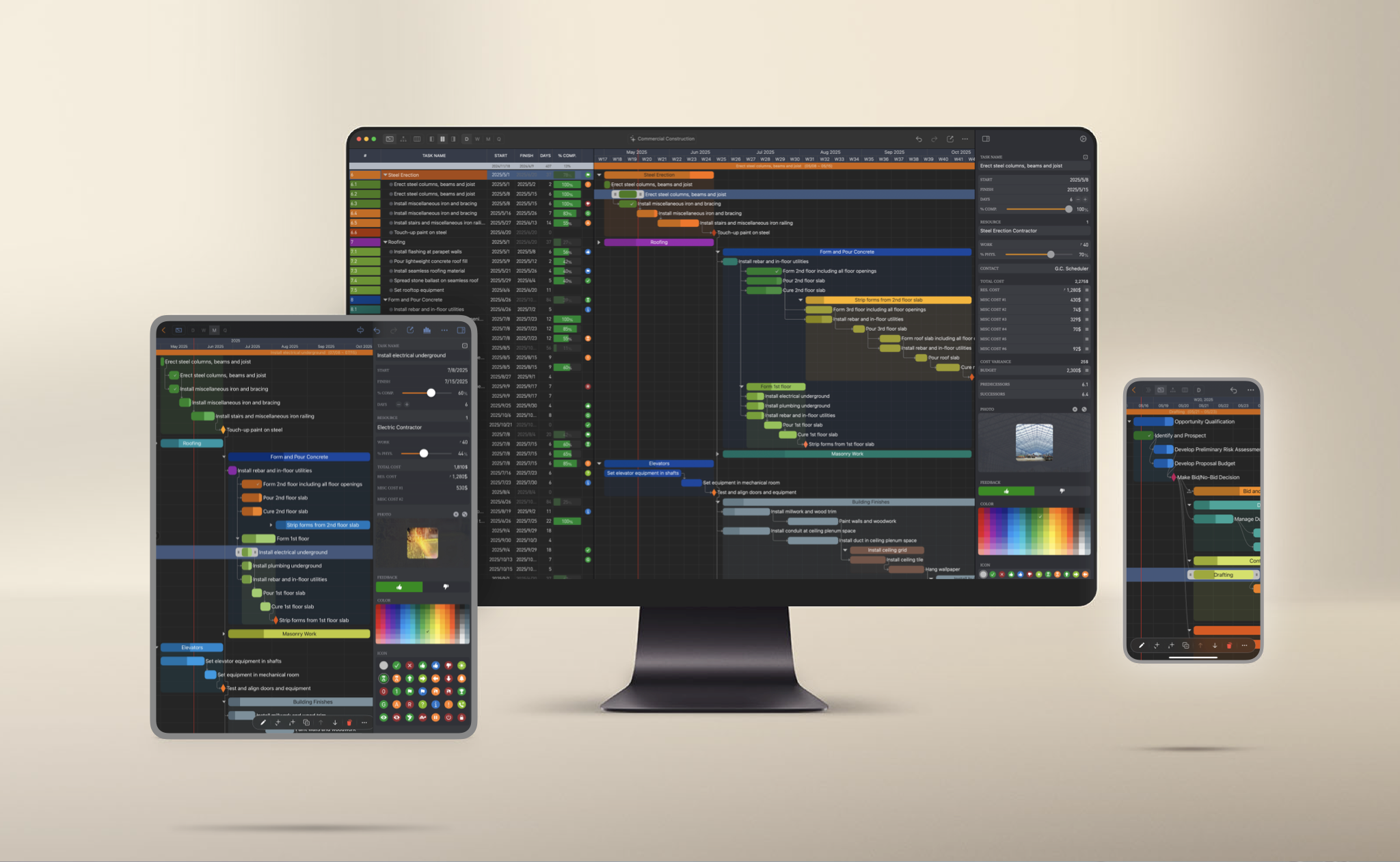
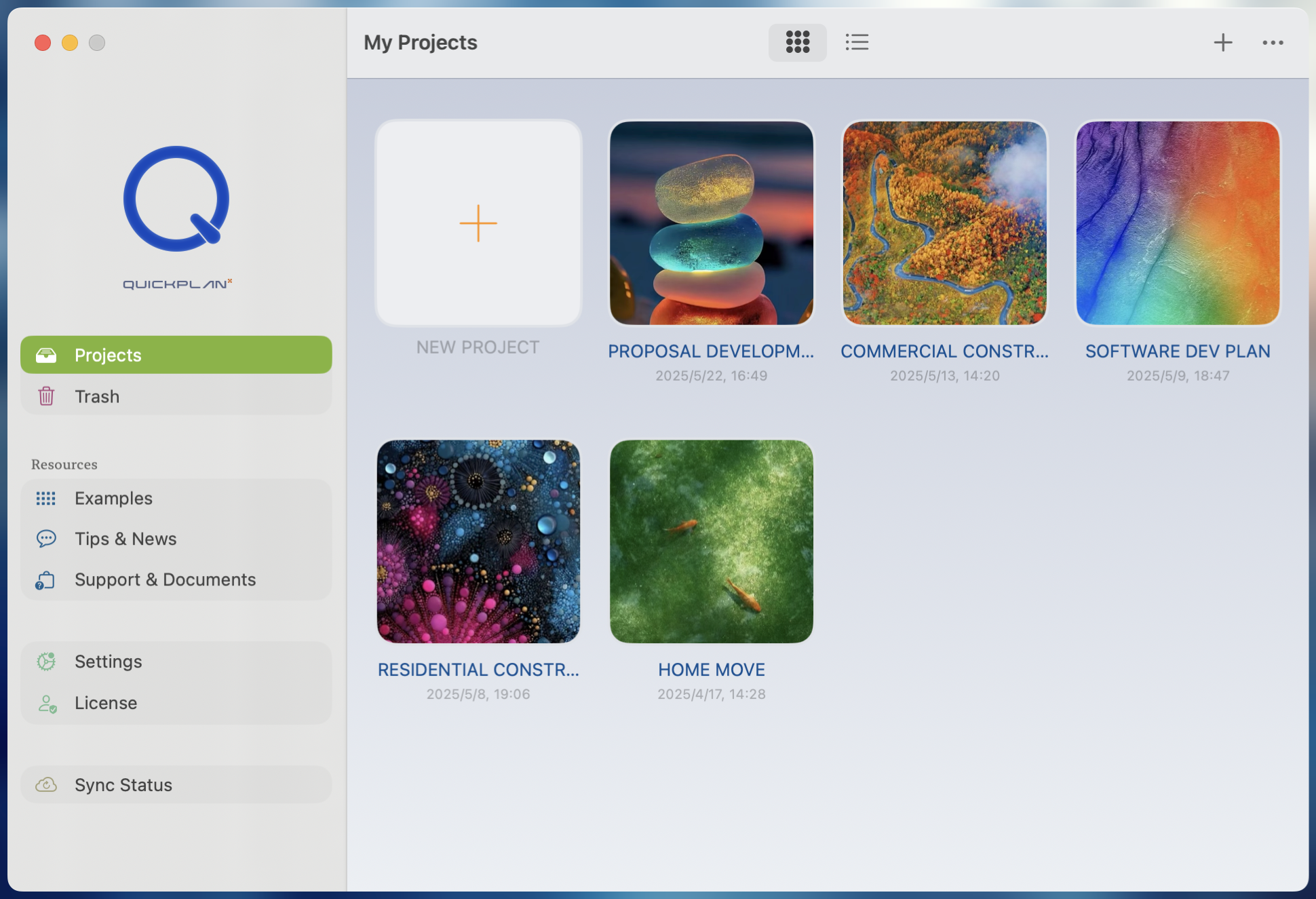
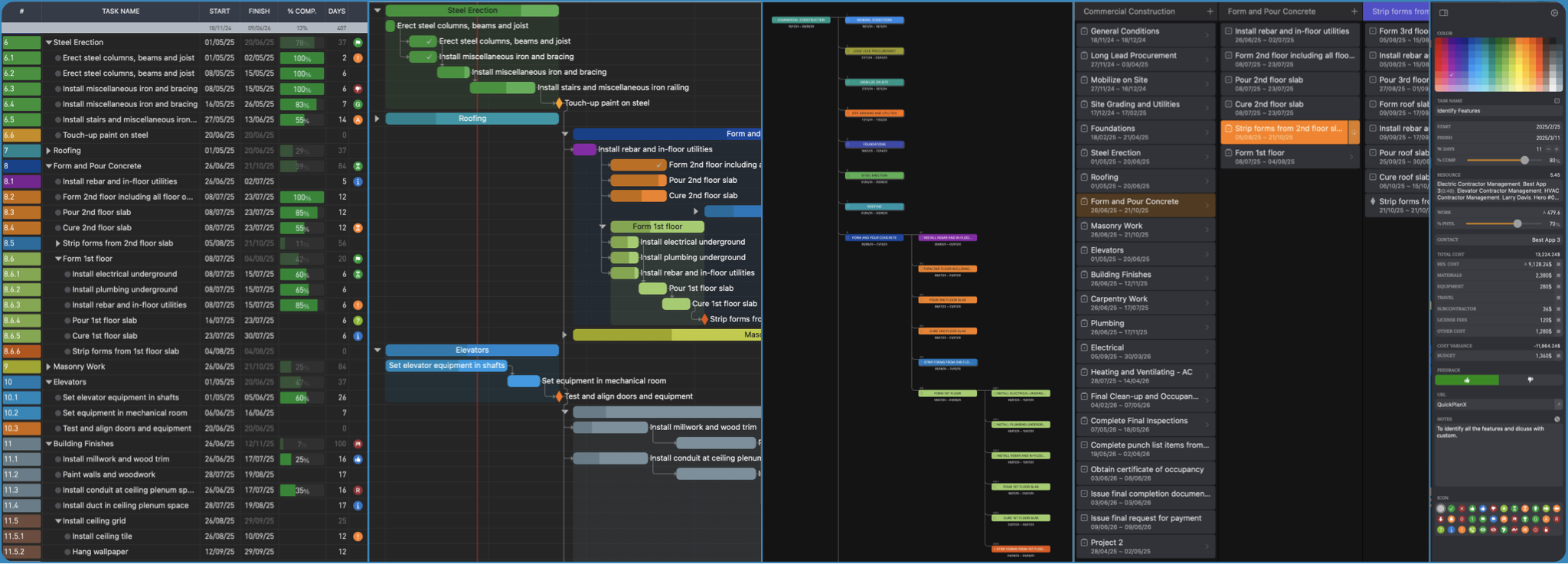
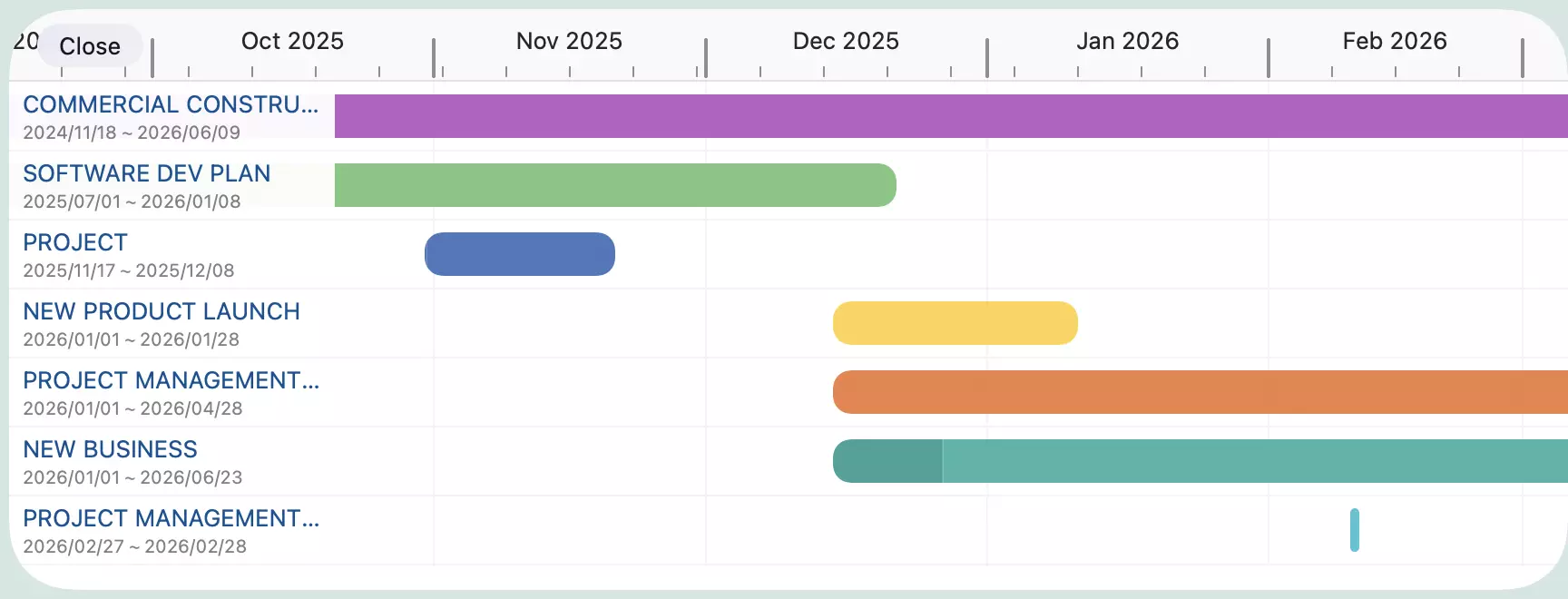
<?xml version="1.0" encoding="utf-8"?>
<feed xmlns="http://www.w3.org/2005/Atom">
    <id>https://qkplan.com/blog</id>
    <title>QuickPlanX Blog</title>
    <updated>2026-05-25T00:00:00.000Z</updated>
    <generator>https://github.com/jpmonette/feed</generator>
    <link rel="alternate" href="https://qkplan.com/blog"/>
    <subtitle>QuickPlanX Blog</subtitle>
    <icon>https://qkplan.com/img/favicon.svg</icon>
    <entry>
        <title type="html"><![CDATA[Version 2.1 — Find Any Setting Instantly with Tag Filtering]]></title>
        <id>https://qkplan.com/blog/version-2-1-release</id>
        <link href="https://qkplan.com/blog/version-2-1-release"/>
        <updated>2026-05-25T00:00:00.000Z</updated>
        <summary type="html"><![CDATA[QuickPlanX 2.1 introduces multi-tag filtering for app settings, making it easier than ever to locate the exact setting you need without scrolling through a long list.]]></summary>
        <content type="html"><![CDATA[<p>We are pleased to announce the release of <strong>QuickPlanX 2.1</strong>.</p>
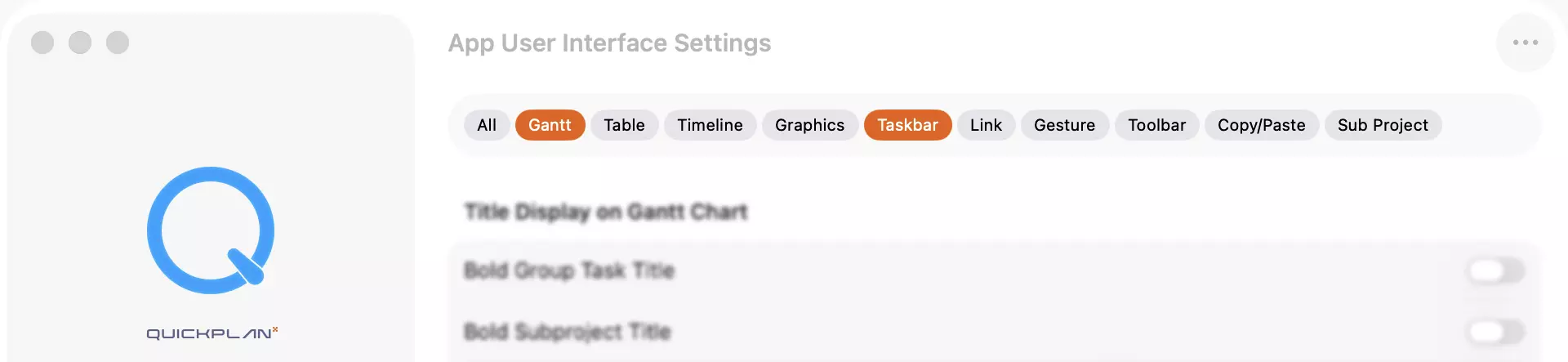
<p>This update introduces <strong>multi-tag filtering in App Settings</strong> — a smarter way to find the settings that matter to you, right when you need them.</p>
<p><img decoding="async" loading="lazy" alt="App Settings Filter Tags" src="https://qkplan.com/assets/images/app-settings-tags-ccdf873d9aaf3bc2a268aea97990aea2.webp" width="1920" height="443" class="img_ev3q"></p>
<h2 class="anchor anchorTargetStickyNavbar_Vzrq" id="the-problem-we-solved">The Problem We Solved<a href="https://qkplan.com/blog/version-2-1-release#the-problem-we-solved" class="hash-link" aria-label="Direct link to The Problem We Solved" title="Direct link to The Problem We Solved" translate="no">​</a></h2>
<p>QuickPlanX offers a rich set of configuration options, and that's a good thing — but it also means your Settings screen can feel overwhelming. Options span multiple themes and categories, and because they don't fall neatly into simple groups, a traditional section-based layout can make finding a specific setting feel like searching for a needle in a haystack.</p>
<h2 class="anchor anchorTargetStickyNavbar_Vzrq" id="tag-filtering-a-faster-path-to-the-right-setting">Tag Filtering: A Faster Path to the Right Setting<a href="https://qkplan.com/blog/version-2-1-release#tag-filtering-a-faster-path-to-the-right-setting" class="hash-link" aria-label="Direct link to Tag Filtering: A Faster Path to the Right Setting" title="Direct link to Tag Filtering: A Faster Path to the Right Setting" translate="no">​</a></h2>
<p>With 2.1, every setting is now tagged with one or more descriptive labels. A tag bar appears at the top of the Settings screen, letting you tap one or more tags to instantly narrow down the list to only the options that match.</p>
<p><strong>What makes this powerful:</strong></p>
<ul>
<li class=""><strong>Multi-select</strong> — combine multiple tags to fine-tune your results. For example, select both <em>Gantt</em> and <em>Display</em> to see only chart-related display settings.</li>
<li class=""><strong>Instant filtering</strong> — the list updates in real time as you tap tags; no searching, no scrolling.</li>
<li class=""><strong>No rigid grouping required</strong> — a single setting can carry multiple tags, so it surfaces whenever any of its tags are active.</li>
</ul>
<p>This approach works especially well when settings overlap across concerns — a date format option, for instance, might be relevant to both <em>Calendar</em> and <em>Export</em>, and with tag filtering, you'll find it either way.</p>
<h2 class="anchor anchorTargetStickyNavbar_Vzrq" id="designed-for-how-you-actually-use-settings">Designed for How You Actually Use Settings<a href="https://qkplan.com/blog/version-2-1-release#designed-for-how-you-actually-use-settings" class="hash-link" aria-label="Direct link to Designed for How You Actually Use Settings" title="Direct link to Designed for How You Actually Use Settings" translate="no">​</a></h2>
<p>Most people visit Settings with a specific goal in mind — they want to change one thing. Tag filtering is built around that reality. Instead of forcing you to scan the entire list or remember which section a setting lives in, you simply tap the tag closest to your intent and the relevant options surface immediately.</p>
<p>It's a small change with a meaningful impact on your day-to-day workflow.</p>
<p>We hope you enjoy this update. As always, your feedback shapes what we build next.</p>]]></content>
        <author>
            <name>Philip Lee</name>
        </author>
        <category label="release" term="release"/>
    </entry>
    <entry>
        <title type="html"><![CDATA[In-Progress View — See All Your Active Tasks at a Glance]]></title>
        <id>https://qkplan.com/blog/version-2-0-release</id>
        <link href="https://qkplan.com/blog/version-2-0-release"/>
        <updated>2026-05-14T00:00:00.000Z</updated>
        <summary type="html"><![CDATA[QuickPlanX 2.0 is here, introducing the In-Progress View — a consolidated daily dashboard of every task in motion across all your projects.]]></summary>
        <content type="html"><![CDATA[<p>We are thrilled to announce the release of <strong>QuickPlanX 2.0</strong>.</p>
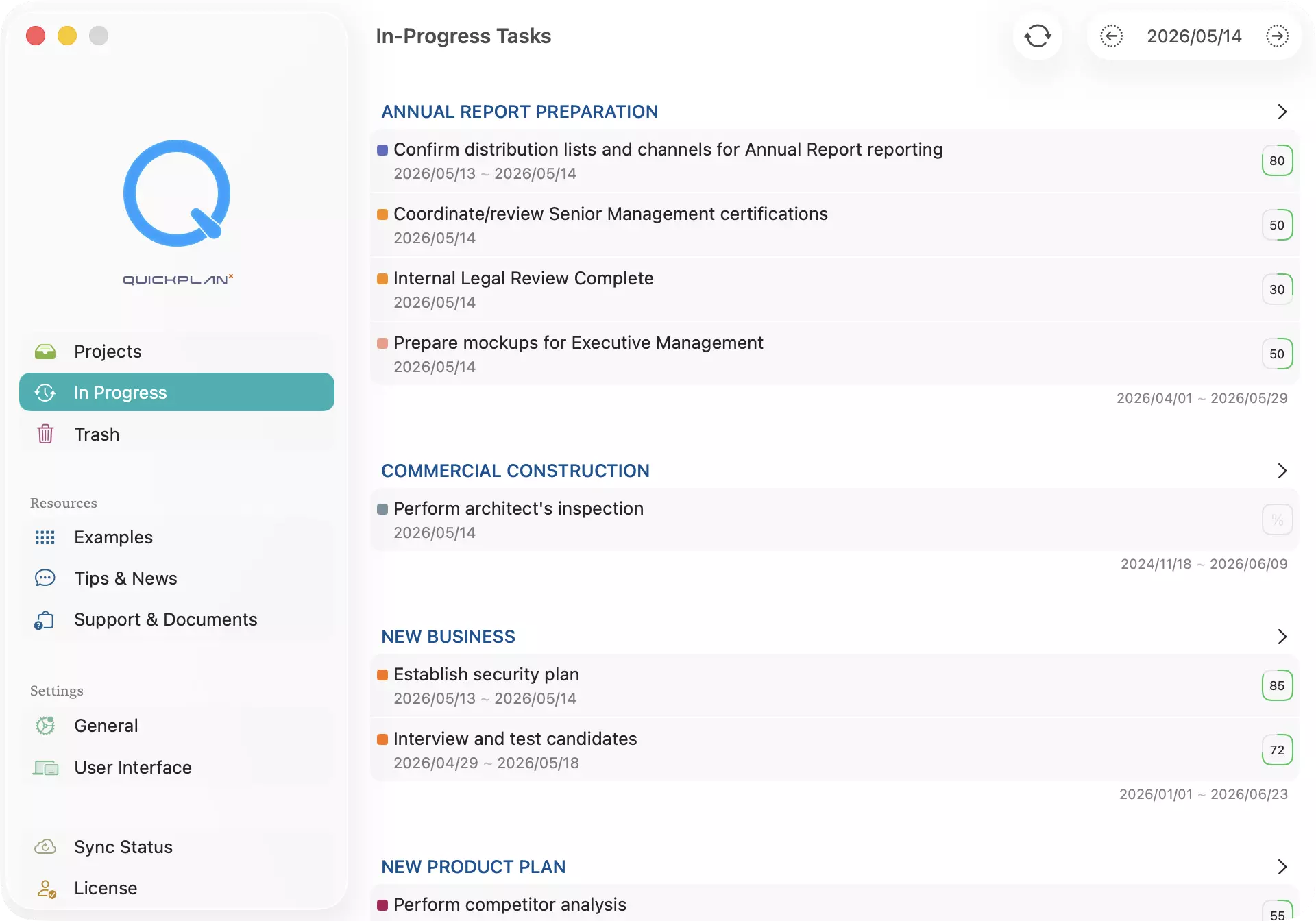
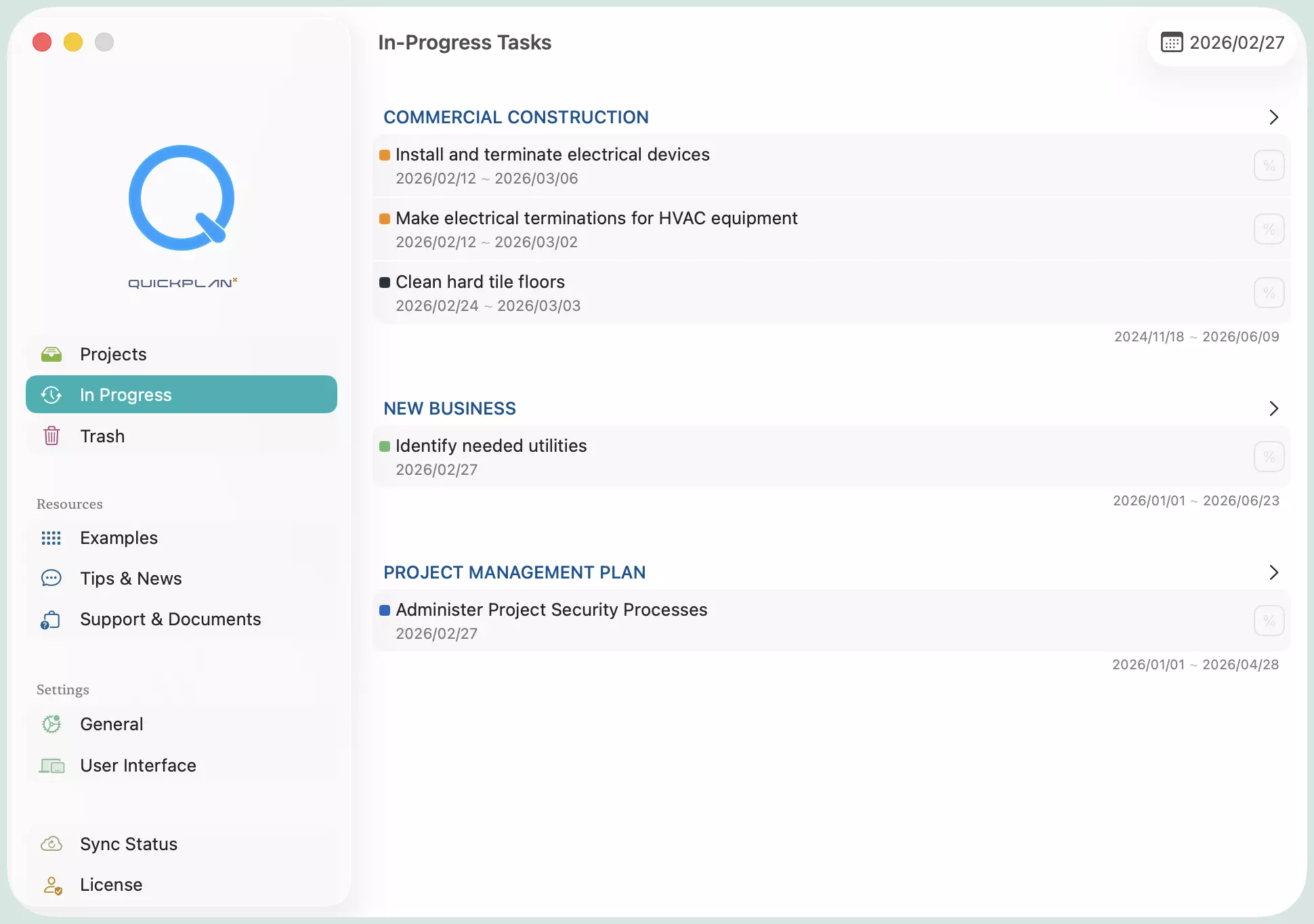
<p>This update introduces the <strong>In-Progress View</strong> — a brand-new panel in the QuickPlanX welcome window that shows every task currently in progress, across all your projects, in one consolidated view.</p>
<p><img decoding="async" loading="lazy" alt="In-Progress View" src="https://qkplan.com/assets/images/in-progress-view-fe8900ca9053d26b9e2dcbe6d2e9b3f2.webp" width="1920" height="1344" class="img_ev3q"></p>
<p>No more jumping between projects to track what's active. The In-Progress View groups tasks by project so you can see at a glance what is running and where it belongs — all from a single, focused screen.</p>
<p><strong>What's new in 2.0:</strong></p>
<ul>
<li class=""><strong>Daily task dashboard</strong> — see all in-progress tasks for today by default, or browse any date using the arrow buttons in the toolbar.</li>
<li class=""><strong>Cross-project visibility</strong> — tasks are grouped by project, giving you immediate context without switching views.</li>
<li class=""><strong>One-tap navigation</strong> — tap any task to jump directly to it inside its project.</li>
<li class=""><strong>Manual refresh</strong> — after editing tasks, tap the Refresh button to reload the latest data instantly.</li>
</ul>
<p><a class="" href="https://qkplan.com/docs/inprogress/in-app">Learn more about the In-Progress View →</a></p>]]></content>
        <author>
            <name>Philip Lee</name>
        </author>
        <category label="release" term="release"/>
    </entry>
    <entry>
        <title type="html"><![CDATA[Project Gantt Dashboard]]></title>
        <id>https://qkplan.com/blog/version-1-1-release</id>
        <link href="https://qkplan.com/blog/version-1-1-release"/>
        <updated>2026-05-06T00:00:00.000Z</updated>
        <summary type="html"><![CDATA[QuickPlanX 1.1 is here, introducing the Project Gantt Dashboard — a consolidated timeline view of your entire project portfolio.]]></summary>
        <content type="html"><![CDATA[<p>We are excited to announce the release of <strong>QuickPlanX 1.1</strong>.</p>
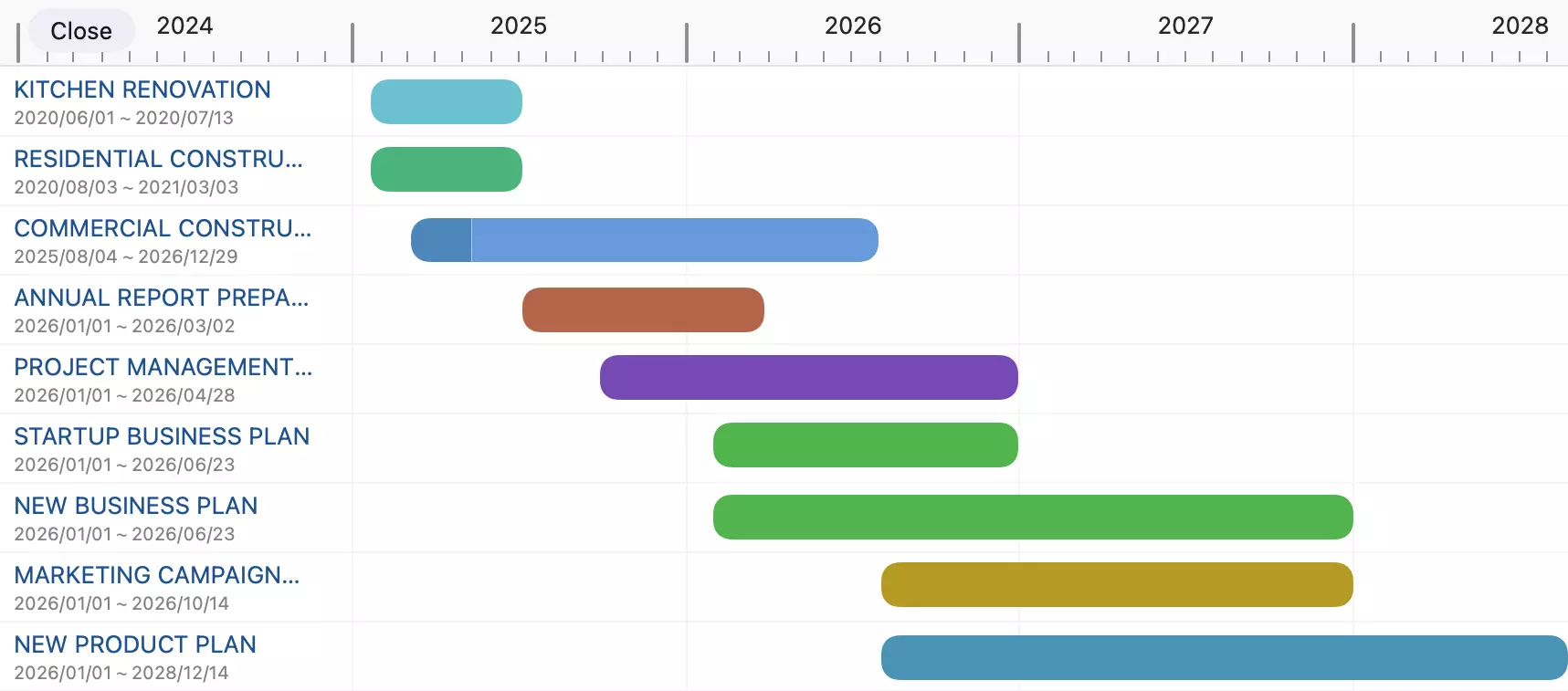
<p>This update introduces the <strong>Project Gantt Dashboard</strong> — a new consolidated timeline that displays all your projects in a single, high-level view. It's the ultimate vantage point to monitor the alignment of multiple projects and oversee your entire portfolio status at a glance.</p>
<p><img decoding="async" loading="lazy" alt="Gantt Dashboard" src="https://qkplan.com/assets/images/gantt-dashboard-347b9d15c10f3f91668339e5c92dfa96.webp" width="1717" height="757" class="img_ev3q"></p>
<p><a class="" href="https://qkplan.com/docs/projects/my-projects#gantt">Learn more about the Project Gantt Dashboard →</a></p>]]></content>
        <author>
            <name>Philip Lee</name>
        </author>
        <category label="release" term="release"/>
    </entry>
    <entry>
        <title type="html"><![CDATA[QuickPlanX - A Bold New Era in Project Planning]]></title>
        <id>https://qkplan.com/blog/quickplanx-go-live</id>
        <link href="https://qkplan.com/blog/quickplanx-go-live"/>
        <updated>2026-05-04T00:00:00.000Z</updated>
        <summary type="html"><![CDATA[A New Chapter in Project Planning]]></summary>
        <content type="html"><![CDATA[<h2 class="anchor anchorTargetStickyNavbar_Vzrq" id="a-new-chapter-in-project-planning">A New Chapter in Project Planning<a href="https://qkplan.com/blog/quickplanx-go-live#a-new-chapter-in-project-planning" class="hash-link" aria-label="Direct link to A New Chapter in Project Planning" title="Direct link to A New Chapter in Project Planning" translate="no">​</a></h2>
<div class="theme-admonition theme-admonition-tip admonition_xJq3 alert alert--success"><div class="admonitionHeading_Gvgb"><span class="admonitionIcon_Rf37"><svg viewBox="0 0 12 16"><path fill-rule="evenodd" d="M6.5 0C3.48 0 1 2.19 1 5c0 .92.55 2.25 1 3 1.34 2.25 1.78 2.78 2 4v1h5v-1c.22-1.22.66-1.75 2-4 .45-.75 1-2.08 1-3 0-2.81-2.48-5-5.5-5zm3.64 7.48c-.25.44-.47.8-.67 1.11-.86 1.41-1.25 2.06-1.45 3.23-.02.05-.02.11-.02.17H5c0-.06 0-.13-.02-.17-.2-1.17-.59-1.83-1.45-3.23-.2-.31-.42-.67-.67-1.11C2.44 6.78 2 5.65 2 5c0-2.2 2.02-4 4.5-4 1.22 0 2.36.42 3.22 1.19C10.55 2.94 11 3.94 11 5c0 .66-.44 1.78-.86 2.48zM4 14h5c-.23 1.14-1.3 2-2.5 2s-2.27-.86-2.5-2z"></path></svg></span><em>To our longtime QuickPlan users — thank you!</em></div><div class="admonitionContent_BuS1"><p>Your feedback, suggestions, and ongoing support have helped shape every feature of QuickPlanX. This new version isn't just a redesign - it's a response to what you've asked for over the years. We've built it for you, and we're excited to share what's next.</p></div></div>
<p>Over 13 years ago, we launched a mission to make project planning simpler and more accessible across your favorite Apple devices. With the QuickPlan apps for iPhone, iPad, and Mac, we grew alongside you — adapting, improving, and innovating in response to your evolving needs.</p>
<p>Today, we're excited to unveil the next step in that journey: <strong>QuickPlanX</strong> — a completely redesigned and reimagined project planning experience, built on everything we've learned from you and the latest advances in technology.</p>
<p><a href="https://itunes.apple.com/app/id6502736030" target="_blank" rel="noopener noreferrer" class=""><img decoding="async" loading="lazy" alt="QuickPlanX" src="https://qkplan.com/assets/images/quickplanx-84b97e2c422e71f1229ab5753aff5ebf.webp" width="2048" height="1456" class="img_ev3q"></a></p>
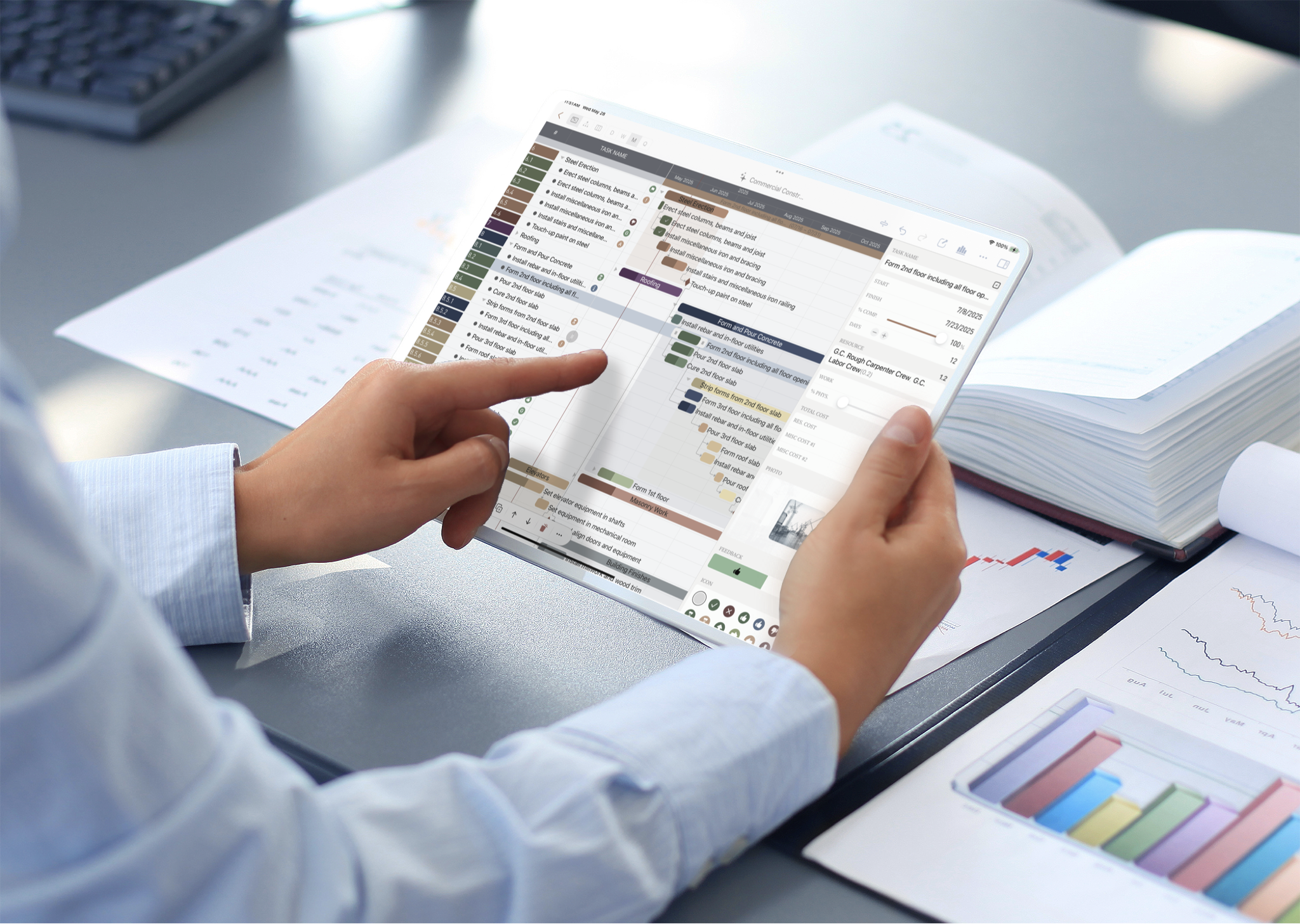
<p>QuickPlanX isn't just an update — it's a reinvention. Inspired by user feedback and driven by a vision for the future, QuickPlanX offers a smarter, faster, and more seamless way to manage your projects.</p>
<p>👉 <a href="https://itunes.apple.com/app/id6502736030" target="_blank" rel="noopener noreferrer" class="">Try QuickPlanX now on the App Store</a></p>
<h2 class="anchor anchorTargetStickyNavbar_Vzrq" id="one-app-all-your-devices">One App, All Your Devices<a href="https://qkplan.com/blog/quickplanx-go-live#one-app-all-your-devices" class="hash-link" aria-label="Direct link to One App, All Your Devices" title="Direct link to One App, All Your Devices" translate="no">​</a></h2>
<p><em>One Seamless Experience.</em></p>
<p>QuickPlanX marks a major leap forward from our earlier approach of separate apps for different platforms. Now, with one universal app, you can manage your projects across <code>iPhone</code>, <code>iPad</code>, and <code>Mac</code> - included in one subscription.</p>
<p>This unified design ensures a consistent, smooth experience no matter where you're working, allowing you to stay in sync and in control at all times.</p>
<p><img decoding="async" loading="lazy" alt="QuickPlanX on VisionOS" src="https://qkplan.com/assets/images/quickplanx-uniform-dbc756eef7915726f23d921bb6ab6a52.webp" width="2048" height="1261" class="img_ev3q"></p>
<h2 class="anchor anchorTargetStickyNavbar_Vzrq" id="automatic-syncing">Automatic Syncing<a href="https://qkplan.com/blog/quickplanx-go-live#automatic-syncing" class="hash-link" aria-label="Direct link to Automatic Syncing" title="Direct link to Automatic Syncing" translate="no">​</a></h2>
<p>Say goodbye to manual file management and the quirks of iCloud Drive document syncing. QuickPlanX uses <strong>Apple's CloudKit</strong> — a secure, high-performance database system — to automatically sync your project data across all your devices.</p>
<ul>
<li class="">No more version mismatches</li>
<li class="">No more wondering if your edits saved</li>
<li class="">Just up-to-date plans, always in your pocket</li>
</ul>
<p>While syncing isn't strictly real-time, it's fast, reliable, and completely hands-free — so you can focus on planning, not syncing.</p>
<p><a class="" href="https://qkplan.com/docs/sync/overview"><img decoding="async" loading="lazy" alt="CloudKit" src="https://qkplan.com/assets/images/cloudkit-554114499b0d8d48d514e0efb4a6f44b.webp" width="2048" height="1080" class="img_ev3q"></a></p>
<p><a class="" href="https://qkplan.com/docs/sync/overview">Learn more about sync via iCloud</a>.</p>
<h2 class="anchor anchorTargetStickyNavbar_Vzrq" id="smarter-views-better-insight">Smarter Views, Better Insight<a href="https://qkplan.com/blog/quickplanx-go-live#smarter-views-better-insight" class="hash-link" aria-label="Direct link to Smarter Views, Better Insight" title="Direct link to Smarter Views, Better Insight" translate="no">​</a></h2>
<p>QuickPlanX builds on the familiar Table and Gantt Chart views you know and love, and introduces two powerful new perspectives:</p>
<ul>
<li class=""><strong>Tree View</strong> – Offers a structured, top-down look at your project hierarchy for clear task relationships. <a class="" href="https://qkplan.com/docs/maintenance/task/new/tree">Learn more about the Tree View</a>.</li>
<li class=""><strong>Column View</strong> – Inspired by the Finder's column layout on macOS, this view presents tasks in a multi-column format that mirrors your project's tree structure. It's ideal for navigating and managing complex hierarchies with ease and clarity. <a class="" href="https://qkplan.com/docs/maintenance/task/new/column">Learn more about the Column View</a>.</li>
</ul>
<p>Each view offers unique advantages—whether you're drilling into details or managing high-level progress. And with a <strong>centralized <a class="" href="https://qkplan.com/docs/maintenance/task/update/inspector">Inspector panel</a></strong>, updating tasks is faster and easier than ever.</p>
<p>QuickPlanX adapts to your workflow, offering flexibility without complexity — so you can plan <strong>your way, with confidence</strong>.</p>
<h2 class="anchor anchorTargetStickyNavbar_Vzrq" id="a-fresh-modern-interface">A Fresh, Modern Interface<a href="https://qkplan.com/blog/quickplanx-go-live#a-fresh-modern-interface" class="hash-link" aria-label="Direct link to A Fresh, Modern Interface" title="Direct link to A Fresh, Modern Interface" translate="no">​</a></h2>
<p>QuickPlanX features a sleek, intuitive design that blends professional polish with a user-friendly experience. Every detail has been crafted to help you do more, faster — without friction.</p>
<p>From subtle animations to a thoughtfully arranged layout, the interface enhances your workflow without getting in your way.</p>
<p><img decoding="async" loading="lazy" alt="Welcome Window" src="https://qkplan.com/assets/images/quickplanx-welcome-d7a587ca2b5675bc7bb7a15e3453eebc.webp" width="1940" height="1325" class="img_ev3q"></p>
<h2 class="anchor anchorTargetStickyNavbar_Vzrq" id="faster-smoother-operations">Faster, Smoother Operations<a href="https://qkplan.com/blog/quickplanx-go-live#faster-smoother-operations" class="hash-link" aria-label="Direct link to Faster, Smoother Operations" title="Direct link to Faster, Smoother Operations" translate="no">​</a></h2>
<p>We've refined and streamlined operations to help you move at the speed of thought. Whether you're organizing tasks or importing large sets of data, QuickPlanX has the tools you need to work effortlessly:</p>
<ul>
<li class=""><strong>Paste indented text</strong> to instantly <a class="" href="https://qkplan.com/docs/maintenance/advanced/copy-paste/outer-text">create project structures</a>.</li>
<li class=""><strong>Import Excel or Numbers</strong> cells to <a class="" href="https://qkplan.com/docs/integrations/sheet">update plans in seconds</a>.</li>
<li class=""><strong>Batch edit</strong> tasks with intuitive gestures and drag/drop functionality.</li>
</ul>
<p><a class="" href="https://qkplan.com/docs/maintenance/advanced/bulk"><img decoding="async" loading="lazy" alt="Welcome Window" src="https://qkplan.com/assets/images/productive-3aa37840957216507812fc1a8b1457a1.webp" width="2048" height="746" class="img_ev3q"></a></p>
<p>These enhancements aren't just time-savers — they're designed to make your experience with QuickPlanX more comfortable, intuitive, and efficient, so you can stay focused on what truly matters.</p>
<p><a class="" href="https://qkplan.com/docs/maintenance/advanced/bulk">Learn more about batch insertion and updating</a>.</p>
<h2 class="anchor anchorTargetStickyNavbar_Vzrq" id="supercharge-your-planning-with-ai">Supercharge Your Planning with AI<a href="https://qkplan.com/blog/quickplanx-go-live#supercharge-your-planning-with-ai" class="hash-link" aria-label="Direct link to Supercharge Your Planning with AI" title="Direct link to Supercharge Your Planning with AI" translate="no">​</a></h2>
<p>QuickPlanX helps you leverage AI-generated text to draft project plans faster than ever. Take a complete work breakdown structure from a simple text prompt, or handwritten notes converted by an AI, and instantly turn them into a structured project plan in seconds. It's a powerful way to kickstart your projects and turn ideas into actionable plans with remarkable speed.</p>
<p><a class="" href="https://qkplan.com/docs/maintenance/productive/ai"><img decoding="async" loading="lazy" alt="AI Assistant" src="https://qkplan.com/assets/images/ai-20c222f01a5d0e4aa992765cf097fe9c.webp" width="2048" height="1118" class="img_ev3q"></a></p>
<p><a class="" href="https://qkplan.com/docs/maintenance/productive/ai">Learn how to supercharge your planning with AI</a>.</p>
<h2 class="anchor anchorTargetStickyNavbar_Vzrq" id="next-level-customization-for-smarter-project-planning">Next-Level Customization for Smarter Project Planning<a href="https://qkplan.com/blog/quickplanx-go-live#next-level-customization-for-smarter-project-planning" class="hash-link" aria-label="Direct link to Next-Level Customization for Smarter Project Planning" title="Direct link to Next-Level Customization for Smarter Project Planning" translate="no">​</a></h2>
<p>Building on the solid foundation of project-level settings in earlier versions, QuickPlanX introduces advanced <a class="" href="https://qkplan.com/docs/customization/fields">task field customization</a>. You can now add a variety of new custom field types, including single-line text, multi-line text, boolean switches, and photo fields—giving you more flexibility to track exactly what matters for your projects. <a class="" href="https://qkplan.com/docs/maintenance/task/about/fields">Learn more about task fields</a>.</p>
<p>Financial tracking in QuickPlanX has been significantly enhanced. You can now input costs into a <strong>dedicated Resource Cost field</strong>, which replaces the old Labor Cost field, providing a more comprehensive view of your expenses. Additionally, QuickPlanX offers <strong>six customizable cost fields</strong>, allowing you to track a variety of financial metrics beyond the basic labor and material costs of earlier versions. The introduction of <strong>Budget</strong> and <strong>Cost Variance</strong> fields further empowers you to monitor your financial performance, offering clear insights into your budget versus actual costs.</p>
<p>QuickPlanX also gives you greater control over <strong>how information is displayed</strong>. Customize the content shown directly on the <a class="" href="https://qkplan.com/docs/customization/gantt-chart">Gantt chart taskbars</a>, as well as in the <a class="" href="https://qkplan.com/docs/customization/tree-view">Tree</a> and <a class="" href="https://qkplan.com/docs/customization/column-view">Column</a> views, so you always see the data most relevant to your workflow.</p>
<p>These deeper customization capabilities allow you to tailor QuickPlanX more precisely to your project needs — boosting clarity, improving efficiency, and keeping your focus where it matters most.</p>
<p><img decoding="async" loading="lazy" alt="Views" src="https://qkplan.com/assets/images/views-7cfee06562fb4210efaa4f21b30ec1fa.webp" width="2048" height="737" class="img_ev3q"></p>
<h2 class="anchor anchorTargetStickyNavbar_Vzrq" id="effortless-sharing--reporting">Effortless Sharing &amp; Reporting<a href="https://qkplan.com/blog/quickplanx-go-live#effortless-sharing--reporting" class="hash-link" aria-label="Direct link to Effortless Sharing &amp; Reporting" title="Direct link to Effortless Sharing &amp; Reporting" translate="no">​</a></h2>
<p>QuickPlanX streamlines your reporting process with flexible export options. Effortlessly share your project plans in various formats such as <a class="" href="https://qkplan.com/docs/reports/pdf-export">PDF</a>, <a class="" href="https://qkplan.com/docs/reports/image-export">Image</a>, and <a class="" href="https://qkplan.com/docs/reports/csv-export">CSV</a>, catering to different reporting and presentation needs. Whether you need to distribute the entire plan or just a specific branch, QuickPlanX has you covered.</p>
<h2 class="anchor anchorTargetStickyNavbar_Vzrq" id="designed-with-your-feedback">Designed with Your Feedback<a href="https://qkplan.com/blog/quickplanx-go-live#designed-with-your-feedback" class="hash-link" aria-label="Direct link to Designed with Your Feedback" title="Direct link to Designed with Your Feedback" translate="no">​</a></h2>
<p>QuickPlanX isn't just a vision of what's possible—it's a direct result of your feedback over the years. From improved syncing and new field types to better task organization and cross-device consistency, your ideas helped guide our every step.</p>
<p>We've listened. We've refined. And now we're delivering a planning experience that reflects the way you truly work.</p>
<h2 class="anchor anchorTargetStickyNavbar_Vzrq" id="why-upgrade-to-quickplanx">Why Upgrade to QuickPlanX?<a href="https://qkplan.com/blog/quickplanx-go-live#why-upgrade-to-quickplanx" class="hash-link" aria-label="Direct link to Why Upgrade to QuickPlanX?" title="Direct link to Why Upgrade to QuickPlanX?" translate="no">​</a></h2>
<p>Upgrading isn't just about moving to a new app — it's about unlocking a better way to plan:</p>
<ul>
<li class="">A unified experience across iPhone, iPad, and Mac</li>
<li class="">Reliable CloudKit-powered syncing</li>
<li class="">Four powerful project views: Table, Gantt, Tree, Column</li>
<li class="">Modern interface and streamlined operations</li>
<li class="">Custom fields and detailed cost tracking</li>
<li class="">Effortless sharing and data management</li>
</ul>
<p><strong>QuickPlanX is the future of QuickPlan</strong> — built on what you loved, and upgraded for what you need now.</p>
<div class="theme-admonition theme-admonition-success admonition_xJq3 alert alert--success"><div class="admonitionHeading_Gvgb"><span class="admonitionIcon_Rf37"><svg viewBox="0 0 12 16"><path fill-rule="evenodd" d="M6.5 0C3.48 0 1 2.19 1 5c0 .92.55 2.25 1 3 1.34 2.25 1.78 2.78 2 4v1h5v-1c.22-1.22.66-1.75 2-4 .45-.75 1-2.08 1-3 0-2.81-2.48-5-5.5-5zm3.64 7.48c-.25.44-.47.8-.67 1.11-.86 1.41-1.25 2.06-1.45 3.23-.02.05-.02.11-.02.17H5c0-.06 0-.13-.02-.17-.2-1.17-.59-1.83-1.45-3.23-.2-.31-.42-.67-.67-1.11C2.44 6.78 2 5.65 2 5c0-2.2 2.02-4 4.5-4 1.22 0 2.36.42 3.22 1.19C10.55 2.94 11 3.94 11 5c0 .66-.44 1.78-.86 2.48zM4 14h5c-.23 1.14-1.3 2-2.5 2s-2.27-.86-2.5-2z"></path></svg></span>Available Now on App Store</div><div class="admonitionContent_BuS1"><p>We're thrilled to announce that QuickPlanX is now officially available on the App Store. This marks a significant milestone in project planning technology, bringing you the enhanced capabilities and intuitive design that represent the future of project planning and management.</p><p>👉 <a href="https://itunes.apple.com/app/id6502736030" target="_blank" rel="noopener noreferrer" class="">Try QuickPlanX now on the App Store</a></p></div></div>
<h3 class="anchor anchorTargetStickyNavbar_Vzrq" id="upgrading-should-feel-familiar">Upgrading Should Feel Familiar<a href="https://qkplan.com/blog/quickplanx-go-live#upgrading-should-feel-familiar" class="hash-link" aria-label="Direct link to Upgrading Should Feel Familiar" title="Direct link to Upgrading Should Feel Familiar" translate="no">​</a></h3>
<p>While QuickPlanX introduces new features and a modern design, it builds directly on what you already know. You'll find the core planning experience familiar—but enhanced with more flexibility, automation, and customization than ever before.</p>
<p>And yes — your existing QuickPlan files can be imported smoothly. <a class="" href="https://qkplan.com/docs/integrations/qpp">Learn how to upgrade here</a>.</p>
<div class="theme-admonition theme-admonition-success admonition_xJq3 alert alert--success"><div class="admonitionHeading_Gvgb"><span class="admonitionIcon_Rf37"><svg viewBox="0 0 12 16"><path fill-rule="evenodd" d="M6.5 0C3.48 0 1 2.19 1 5c0 .92.55 2.25 1 3 1.34 2.25 1.78 2.78 2 4v1h5v-1c.22-1.22.66-1.75 2-4 .45-.75 1-2.08 1-3 0-2.81-2.48-5-5.5-5zm3.64 7.48c-.25.44-.47.8-.67 1.11-.86 1.41-1.25 2.06-1.45 3.23-.02.05-.02.11-.02.17H5c0-.06 0-.13-.02-.17-.2-1.17-.59-1.83-1.45-3.23-.2-.31-.42-.67-.67-1.11C2.44 6.78 2 5.65 2 5c0-2.2 2.02-4 4.5-4 1.22 0 2.36.42 3.22 1.19C10.55 2.94 11 3.94 11 5c0 .66-.44 1.78-.86 2.48zM4 14h5c-.23 1.14-1.3 2-2.5 2s-2.27-.86-2.5-2z"></path></svg></span>Migration</div><div class="admonitionContent_BuS1"><p>QuickPlanX supports importing project files created with legacy QuickPlan apps. <a class="" href="https://qkplan.com/docs/integrations/qpp">Learn how to import your existing QuickPlan files into QuickPlanX</a>.</p></div></div>
<h3 class="anchor anchorTargetStickyNavbar_Vzrq" id="for-you">For You<a href="https://qkplan.com/blog/quickplanx-go-live#for-you" class="hash-link" aria-label="Direct link to For You" title="Direct link to For You" translate="no">​</a></h3>
<p>Thank you for being part of this journey. QuickPlanX is built on over a decade of your trust, feedback, and enthusiasm — and today marks the next chapter.</p>
<p>We can't wait to see what you'll accomplish with it. Welcome to QuickPlanX.</p>]]></content>
        <author>
            <name>Philip Lee</name>
        </author>
        <category label="release" term="release"/>
    </entry>
    <entry>
        <title type="html"><![CDATA[Planned Major Features After Version 1.0]]></title>
        <id>https://qkplan.com/blog/planned-features-after-v1</id>
        <link href="https://qkplan.com/blog/planned-features-after-v1"/>
        <updated>2026-02-27T00:00:00.000Z</updated>
        <summary type="html"><![CDATA[We have completed the major feature development for version 1.0 and are now focusing on making it more stable and user-friendly before its public release.]]></summary>
        <content type="html"><![CDATA[<p>We have completed the major feature development for version 1.0 and are now focusing on making it more stable and user-friendly before its public release.</p>
<p>We are also planning for version 1.1 and beyond. Here are some of the major features we are considering for upcoming versions.</p>
<h2 class="anchor anchorTargetStickyNavbar_Vzrq" id="project-gantt">Project Dashboard in Gantt View<a href="https://qkplan.com/blog/planned-features-after-v1#project-gantt" class="hash-link" aria-label="Direct link to Project Dashboard in Gantt View" title="Direct link to Project Dashboard in Gantt View" translate="no">​</a></h2>
<p>Currently, QuickPlanX displays all your projects in a grid view, which works well for managing your projects. However, we are considering adding a Gantt view to the project dashboard — each project would be displayed as a bar in the Gantt chart, giving you a clear timeline overview of all your projects at a glance.</p>
<p><img decoding="async" loading="lazy" alt="Project Dashboard in Gantt View" src="https://qkplan.com/assets/images/projects-gantt-aea04ebd5a656e1ed5cfd2a43948e079.webp" width="1728" height="660" class="img_ev3q"></p>
<h2 class="anchor anchorTargetStickyNavbar_Vzrq" id="in-progress-tasks">In-Progress Tasks<a href="https://qkplan.com/blog/planned-features-after-v1#in-progress-tasks" class="hash-link" aria-label="Direct link to In-Progress Tasks" title="Direct link to In-Progress Tasks" translate="no">​</a></h2>
<p>We plan to add a new view in the welcome window that lists all in-progress tasks across all your projects. Clicking a task will open the corresponding project and navigate directly to that task in the Gantt chart. This will be especially useful for users managing multiple projects who want to quickly see everything that's currently in progress.</p>
<p><img decoding="async" loading="lazy" alt="In-Progress Tasks" src="https://qkplan.com/assets/images/in-progress-0bf47cc45cc58f107e4df56297d8c7b1.webp" width="1940" height="1364" class="img_ev3q"></p>
<h2 class="anchor anchorTargetStickyNavbar_Vzrq" id="status-day">Status Day<a href="https://qkplan.com/blog/planned-features-after-v1#status-day" class="hash-link" aria-label="Direct link to Status Day" title="Direct link to Status Day" translate="no">​</a></h2>
<p>This feature lets you select a specific day and see all tasks that are behind schedule. You can then bulk-update the status of those tasks to their planned completion rate, or adjust their start dates to better align with the plan. It's designed to help you quickly assess project health and make the necessary adjustments with minimal effort.</p>
<h2 class="anchor anchorTargetStickyNavbar_Vzrq" id="wed-love-your-feedback">We'd Love Your Feedback<a href="https://qkplan.com/blog/planned-features-after-v1#wed-love-your-feedback" class="hash-link" aria-label="Direct link to We'd Love Your Feedback" title="Direct link to We'd Love Your Feedback" translate="no">​</a></h2>
<p>The features above are some of the ideas from our backlog — ones you may be interested in or have been waiting for. We always welcome your feedback and suggestions. Please feel free to <a class="" href="https://qkplan.com/contact">contact us</a>.</p>]]></content>
        <author>
            <name>Philip Lee</name>
        </author>
        <category label="plan" term="plan"/>
        <category label="feature" term="feature"/>
    </entry>
    <entry>
        <title type="html"><![CDATA[Boost Your Efficiency: Master QuickPlanX Like a Pro]]></title>
        <id>https://qkplan.com/blog/boost-your-efficiency</id>
        <link href="https://qkplan.com/blog/boost-your-efficiency"/>
        <updated>2025-12-10T00:00:00.000Z</updated>
        <summary type="html"><![CDATA[What if you could dramatically speed up your project setup? With QuickPlanX, tasks that once took hours now take minutes.]]></summary>
        <content type="html"><![CDATA[<p><strong>What if you could dramatically speed up your project setup?</strong> With QuickPlanX, tasks that once took hours now take minutes.</p>
<p><img decoding="async" loading="lazy" alt="QuickPlanX is unmatched in efficiency" src="https://qkplan.com/assets/images/quickplan-efficience-bf3b68d5b8e2593fbd75e89b0d7b26b9.webp" width="2036" height="1136" class="img_ev3q"></p>
<h2 class="anchor anchorTargetStickyNavbar_Vzrq" id="why-quickplanx-is-the-best-choice-for-efficiency">Why QuickPlanX Is the Best Choice for Efficiency<a href="https://qkplan.com/blog/boost-your-efficiency#why-quickplanx-is-the-best-choice-for-efficiency" class="hash-link" aria-label="Direct link to Why QuickPlanX Is the Best Choice for Efficiency" title="Direct link to Why QuickPlanX Is the Best Choice for Efficiency" translate="no">​</a></h2>
<p>Before diving into advanced techniques, here's what makes QuickPlanX stand out: <strong>efficiency is built into its DNA</strong>.</p>
<p>Unlike tools that bolt on features as afterthoughts, QuickPlanX was designed from day one with <strong>top-tier usability</strong> at its core. Every interaction—from creating a single task to managing complex project hierarchies—has been optimized to minimize clicks and maximize speed. This means even before you learn the power-user features in this guide, you're already working faster than you would with competing tools.</p>
<p>When we launched QuickPlan over a decade ago, we had one mission: eliminate the friction that slows project managers down. While other tools focused on adding features, we obsessed over <strong>operational efficiency</strong>. Today, that same philosophy powers QuickPlanX, and our users consistently tell us it's their biggest competitive advantage.</p>
<p><img decoding="async" loading="lazy" alt="QuickPlanX is unmatched in efficiency" src="https://qkplan.com/assets/images/quickplanx-unmatched-in-efficient-ed2f62a1adf3bccecdeb93b9d9849d9e.webp" width="2048" height="1118" class="img_ev3q"></p>
<p>Ready to unlock your full productivity potential? Let's explore the <strong>best practices</strong> and advanced techniques that will transform how you work.</p>
<h2 class="anchor anchorTargetStickyNavbar_Vzrq" id="-build-task-structures-in-minutes-not-hours">🚀 Build Task Structures in Minutes, Not Hours<a href="https://qkplan.com/blog/boost-your-efficiency#-build-task-structures-in-minutes-not-hours" class="hash-link" aria-label="Direct link to 🚀 Build Task Structures in Minutes, Not Hours" title="Direct link to 🚀 Build Task Structures in Minutes, Not Hours" translate="no">​</a></h2>
<p>Forget creating tasks one by one. QuickPlanX lets you build entire project hierarchies in a single action—whether you're in Table View, Gantt Chart, Tree View, or Column View.</p>
<video width="100%" autoplay="" muted="" loop=""><source src="/assets/medias/quickplanx-that-efficient-21505df3050ecf4c732b13d24bb724fe.mp4"></video>
<p><strong>The secret?</strong> Batch task creation. Prepare your task structure as multiline text, design it in a mind mapping app, or let AI generate your initial plan. Then import everything at once—complete with hierarchy intact.</p>
<div class="theme-admonition theme-admonition-tip admonition_xJq3 alert alert--success"><div class="admonitionHeading_Gvgb"><span class="admonitionIcon_Rf37"><svg viewBox="0 0 12 16"><path fill-rule="evenodd" d="M6.5 0C3.48 0 1 2.19 1 5c0 .92.55 2.25 1 3 1.34 2.25 1.78 2.78 2 4v1h5v-1c.22-1.22.66-1.75 2-4 .45-.75 1-2.08 1-3 0-2.81-2.48-5-5.5-5zm3.64 7.48c-.25.44-.47.8-.67 1.11-.86 1.41-1.25 2.06-1.45 3.23-.02.05-.02.11-.02.17H5c0-.06 0-.13-.02-.17-.2-1.17-.59-1.83-1.45-3.23-.2-.31-.42-.67-.67-1.11C2.44 6.78 2 5.65 2 5c0-2.2 2.02-4 4.5-4 1.22 0 2.36.42 3.22 1.19C10.55 2.94 11 3.94 11 5c0 .66-.44 1.78-.86 2.48zM4 14h5c-.23 1.14-1.3 2-2.5 2s-2.27-.86-2.5-2z"></path></svg></span>Pro Tip</div><div class="admonitionContent_BuS1"><p>Start every new project with batch creation. Defining your complete task structure upfront is faster than adding tasks incrementally and reduces the need for restructuring later.</p></div></div>
<h3 class="anchor anchorTargetStickyNavbar_Vzrq" id="-method-1-draft-in-a-text-editor">📝 Method 1: Draft in a Text Editor<a href="https://qkplan.com/blog/boost-your-efficiency#-method-1-draft-in-a-text-editor" class="hash-link" aria-label="Direct link to 📝 Method 1: Draft in a Text Editor" title="Direct link to 📝 Method 1: Draft in a Text Editor" translate="no">​</a></h3>
<p>Simply use indentation (spaces or tabs) to define your hierarchy. Each line becomes a task, and the indentation level determines parent-child relationships.</p>
<video controls="" width="100%"><source src="/assets/medias/bulk-input-text-636ab695a460dc92c15f2ae45db6296d.mp4"></video>
<h3 class="anchor anchorTargetStickyNavbar_Vzrq" id="-method-2-design-in-a-mind-map">🧠 Method 2: Design in a Mind Map<a href="https://qkplan.com/blog/boost-your-efficiency#-method-2-design-in-a-mind-map" class="hash-link" aria-label="Direct link to 🧠 Method 2: Design in a Mind Map" title="Direct link to 🧠 Method 2: Design in a Mind Map" translate="no">​</a></h3>
<p>Prefer visual thinking? Create your project structure in any mind mapping app, export as OPML, and import directly into QuickPlanX. Your visual brainstorm becomes an actionable project plan instantly.</p>
<p><img decoding="async" loading="lazy" alt="Design your project structure visually with mind maps" src="https://qkplan.com/assets/images/mindmap-concept-93cc0549c4e99e8477489437cc6182aa.webp" width="1124" height="779" class="img_ev3q"></p>
<video controls="" width="100%"><source src="/assets/medias/mindmap-import-53f2b63f4ff66696d9f35a6fff279cac.mp4"></video>
<p>📖 <strong>Deep Dive</strong>: <a class="" href="https://qkplan.com/docs/maintenance/productive/task-structure">Complete Guide to Rapid Task Structure Building</a></p>
<hr>
<h2 class="anchor anchorTargetStickyNavbar_Vzrq" id="-seamless-spreadsheet-integration">📊 Seamless Spreadsheet Integration<a href="https://qkplan.com/blog/boost-your-efficiency#-seamless-spreadsheet-integration" class="hash-link" aria-label="Direct link to 📊 Seamless Spreadsheet Integration" title="Direct link to 📊 Seamless Spreadsheet Integration" translate="no">​</a></h2>
<p>Already comfortable with <strong>Excel</strong>, <strong>Numbers</strong>, or <strong>Google Sheets</strong>? Keep using them. QuickPlanX works <em>with</em> your existing workflow, not against it.</p>
<p><img decoding="async" loading="lazy" alt="Work seamlessly between QuickPlanX and your favorite spreadsheet apps" src="https://qkplan.com/assets/images/spreadsheet-banner-68f6506d10bedfe25394f0121153db2c.webp" width="2048" height="1070" class="img_ev3q"></p>
<p>Here's what makes this integration powerful:</p>
<ul>
<li class=""><strong>Instant Task Creation</strong>: Copy task names from your spreadsheet, paste into QuickPlanX, and watch your project structure appear</li>
<li class=""><strong>Batch Property Updates</strong>: Update dates, resources, costs, and more across multiple tasks by copying columns from your spreadsheet directly into QuickPlanX's Table View</li>
</ul>
<video controls="" width="100%"><source src="/assets/medias/excel-integration-simple-3ef4adab59df1f2900d4271c806123ee.mp4"></video>
<div class="theme-admonition theme-admonition-info admonition_xJq3 alert alert--info"><div class="admonitionHeading_Gvgb"><span class="admonitionIcon_Rf37"><svg viewBox="0 0 14 16"><path fill-rule="evenodd" d="M7 2.3c3.14 0 5.7 2.56 5.7 5.7s-2.56 5.7-5.7 5.7A5.71 5.71 0 0 1 1.3 8c0-3.14 2.56-5.7 5.7-5.7zM7 1C3.14 1 0 4.14 0 8s3.14 7 7 7 7-3.14 7-7-3.14-7-7-7zm1 3H6v5h2V4zm0 6H6v2h2v-2z"></path></svg></span>Why No "Import from Excel" Feature?</div><div class="admonitionContent_BuS1"><p>Copy-paste gives you more flexibility than a dedicated import function. You can selectively import data, combine sources, and update existing projects—not just create new ones.</p></div></div>
<p>📖 <strong>Deep Dive</strong>: <a class="" href="https://qkplan.com/docs/maintenance/productive/spreadsheet">Spreadsheet Integration Best Practices</a></p>
<hr>
<h2 class="anchor anchorTargetStickyNavbar_Vzrq" id="-supercharge-your-planning-with-ai">🤖 Supercharge Your Planning with AI<a href="https://qkplan.com/blog/boost-your-efficiency#-supercharge-your-planning-with-ai" class="hash-link" aria-label="Direct link to 🤖 Supercharge Your Planning with AI" title="Direct link to 🤖 Supercharge Your Planning with AI" translate="no">​</a></h2>
<p>Starting a new project in an unfamiliar domain? Let AI be your expert assistant. Modern AI tools can draft comprehensive project plans in seconds—complete with task hierarchies, timelines, and work breakdown structures.</p>
<p><img decoding="async" loading="lazy" alt="Leverage AI to accelerate your project planning" src="https://qkplan.com/assets/images/ai-banner-7d17932383d498a0a339664b1e44094f.webp" width="2048" height="1021" class="img_ev3q"></p>
<h3 class="anchor anchorTargetStickyNavbar_Vzrq" id="generate-complete-project-plans">Generate Complete Project Plans<a href="https://qkplan.com/blog/boost-your-efficiency#generate-complete-project-plans" class="hash-link" aria-label="Direct link to Generate Complete Project Plans" title="Direct link to Generate Complete Project Plans" translate="no">​</a></h3>
<p>Ask AI for more than just task names. Request:</p>
<ul>
<li class=""><strong>Hierarchical task breakdowns</strong> with proper parent-child relationships</li>
<li class=""><strong>Suggested timelines</strong> with start and end dates</li>
<li class=""><strong>Complete WBS structures</strong> following industry best practices</li>
</ul>
<video controls="" width="100%"><source src="/assets/medias/ai-bulk-cddd1baf91825716cd8aacfd6173bfc9.mp4"></video>
<h3 class="anchor anchorTargetStickyNavbar_Vzrq" id="from-whiteboard-to-project-plan">From Whiteboard to Project Plan<a href="https://qkplan.com/blog/boost-your-efficiency#from-whiteboard-to-project-plan" class="hash-link" aria-label="Direct link to From Whiteboard to Project Plan" title="Direct link to From Whiteboard to Project Plan" translate="no">​</a></h3>
<p>Had a brainstorming session? Snapped a photo of your whiteboard notes? AI can extract and structure that handwritten content directly into importable text.</p>
<p><img decoding="async" loading="lazy" alt="Transform handwritten notes into structured project tasks" src="https://qkplan.com/assets/images/handwritten-e96ea0f5f8d70cf7e17602e8cf07d255.webp" width="2048" height="980" class="img_ev3q"></p>
<video controls="" width="100%"><source src="/assets/medias/ai-handwritten-6d72ffbf3d6f171b3da20728c03ac055.mp4"></video>
<div class="theme-admonition theme-admonition-tip admonition_xJq3 alert alert--success"><div class="admonitionHeading_Gvgb"><span class="admonitionIcon_Rf37"><svg viewBox="0 0 12 16"><path fill-rule="evenodd" d="M6.5 0C3.48 0 1 2.19 1 5c0 .92.55 2.25 1 3 1.34 2.25 1.78 2.78 2 4v1h5v-1c.22-1.22.66-1.75 2-4 .45-.75 1-2.08 1-3 0-2.81-2.48-5-5.5-5zm3.64 7.48c-.25.44-.47.8-.67 1.11-.86 1.41-1.25 2.06-1.45 3.23-.02.05-.02.11-.02.17H5c0-.06 0-.13-.02-.17-.2-1.17-.59-1.83-1.45-3.23-.2-.31-.42-.67-.67-1.11C2.44 6.78 2 5.65 2 5c0-2.2 2.02-4 4.5-4 1.22 0 2.36.42 3.22 1.19C10.55 2.94 11 3.94 11 5c0 .66-.44 1.78-.86 2.48zM4 14h5c-.23 1.14-1.3 2-2.5 2s-2.27-.86-2.5-2z"></path></svg></span>Works with Any AI</div><div class="admonitionContent_BuS1"><p>While our demos use Gemini, these techniques work equally well with ChatGPT, Claude, Copilot, or any other AI assistant. Adjust prompts as needed for your preferred tool.</p></div></div>
<p>📖 <strong>Deep Dive</strong>: <a class="" href="https://qkplan.com/docs/maintenance/productive/ai">AI-Powered Planning Techniques &amp; Prompts</a></p>
<hr>
<h2 class="anchor anchorTargetStickyNavbar_Vzrq" id="-smart-operations-for-daily-efficiency">⚡ Smart Operations for Daily Efficiency<a href="https://qkplan.com/blog/boost-your-efficiency#-smart-operations-for-daily-efficiency" class="hash-link" aria-label="Direct link to ⚡ Smart Operations for Daily Efficiency" title="Direct link to ⚡ Smart Operations for Daily Efficiency" translate="no">​</a></h2>
<p>Beyond project setup, QuickPlanX offers dozens of smart features that save time on everyday tasks.</p>
<h3 class="anchor anchorTargetStickyNavbar_Vzrq" id="split-tasks-instantly">Split Tasks Instantly<a href="https://qkplan.com/blog/boost-your-efficiency#split-tasks-instantly" class="hash-link" aria-label="Direct link to Split Tasks Instantly" title="Direct link to Split Tasks Instantly" translate="no">​</a></h3>
<p>Large task feeling overwhelming? Split it into manageable subtasks with a single action. On Mac, this becomes even faster with keyboard and mouse shortcuts.</p>
<video controls="" width="100%"><source src="/assets/medias/split-task-2e1d77c668f6f99f4334215f05e56d1b.mp4"></video>
<h3 class="anchor anchorTargetStickyNavbar_Vzrq" id="your-efficiency-toolkit">Your Efficiency Toolkit<a href="https://qkplan.com/blog/boost-your-efficiency#your-efficiency-toolkit" class="hash-link" aria-label="Direct link to Your Efficiency Toolkit" title="Direct link to Your Efficiency Toolkit" translate="no">​</a></h3>
<table><thead><tr><th>Feature</th><th>What It Does</th><th>Best For</th></tr></thead><tbody><tr><td><strong>Recurring Tasks</strong></td><td>Generate multiple instances of repeating tasks</td><td>Weekly meetings, monthly reviews</td></tr><tr><td><strong>Cross-Project Copy</strong></td><td>Drag-and-drop or copy-paste tasks between projects</td><td>Reusing proven task structures</td></tr><tr><td><strong>Project Duplication</strong></td><td>Clone entire projects as templates</td><td>Standardized project types</td></tr><tr><td><strong>Color Inheritance</strong></td><td>Apply parent colors to all children</td><td>Visual organization</td></tr><tr><td><strong>Keyboard Shortcuts</strong></td><td><code>⌘ →/←</code> to shift dates, <code>⇧ +/-</code> to adjust duration</td><td>Power users on Mac</td></tr></tbody></table>
<p>📖 <strong>Deep Dive</strong>: <a class="" href="https://qkplan.com/docs/maintenance/productive/smart">All Smart Operations &amp; Shortcuts</a></p>
<hr>
<h2 class="anchor anchorTargetStickyNavbar_Vzrq" id="-start-working-smarter-today">🎯 Start Working Smarter Today<a href="https://qkplan.com/blog/boost-your-efficiency#-start-working-smarter-today" class="hash-link" aria-label="Direct link to 🎯 Start Working Smarter Today" title="Direct link to 🎯 Start Working Smarter Today" translate="no">​</a></h2>
<p>Efficiency isn't about working harder—it's about <strong>removing friction</strong> between your ideas and their execution. QuickPlanX was built on this principle, and every feature reflects it.</p>
<p><strong>Your next steps:</strong></p>
<ol>
<li class="">✅ Try batch task creation on your next project</li>
<li class="">✅ Experiment with AI for initial project drafts</li>
<li class="">✅ Learn 2-3 keyboard shortcuts that match your workflow</li>
<li class="">✅ Explore the full productivity guide below</li>
</ol>
<p>📚 <strong>Ready to master every efficiency feature?</strong> <a class="" href="https://qkplan.com/docs/maintenance/productive">Explore the Complete Productivity Guide →</a></p>]]></content>
        <author>
            <name>Philip Lee</name>
        </author>
        <category label="productivity" term="productivity"/>
        <category label="efficiency" term="efficiency"/>
        <category label="tips" term="tips"/>
        <category label="workflow" term="workflow"/>
        <category label="project-management" term="project-management"/>
    </entry>
    <entry>
        <title type="html"><![CDATA[QuickPlanX Public Beta]]></title>
        <id>https://qkplan.com/blog/quickplanx-public-beta1</id>
        <link href="https://qkplan.com/blog/quickplanx-public-beta1"/>
        <updated>2025-05-08T00:00:00.000Z</updated>
        <summary type="html"><![CDATA[QuickPlanX is now officially available. If you're a longtime QuickPlan user, here's where to get it.]]></summary>
        <content type="html"><![CDATA[<h2 class="anchor anchorTargetStickyNavbar_Vzrq" id="a-new-chapter-in-project-planning">A New Chapter in Project Planning<a href="https://qkplan.com/blog/quickplanx-public-beta1#a-new-chapter-in-project-planning" class="hash-link" aria-label="Direct link to A New Chapter in Project Planning" title="Direct link to A New Chapter in Project Planning" translate="no">​</a></h2>
<h3 class="anchor anchorTargetStickyNavbar_Vzrq" id="update">Update<a href="https://qkplan.com/blog/quickplanx-public-beta1#update" class="hash-link" aria-label="Direct link to Update" title="Direct link to Update" translate="no">​</a></h3>
<p>QuickPlanX is now officially available. Check out the <a class="" href="https://qkplan.com/blog/quickplanx-go-live">release announcement</a> for everything that's new.</p>
<h3 class="anchor anchorTargetStickyNavbar_Vzrq" id="download-quickplanx">Download QuickPlanX<a href="https://qkplan.com/blog/quickplanx-public-beta1#download-quickplanx" class="hash-link" aria-label="Direct link to Download QuickPlanX" title="Direct link to Download QuickPlanX" translate="no">​</a></h3>
<p>👉 <a href="https://itunes.apple.com/app/id6502736030" target="_blank" rel="noopener noreferrer" class="">Try QuickPlanX now on the App Store</a></p>
<p><a href="https://itunes.apple.com/app/id6502736030" target="_blank" rel="noopener noreferrer" class=""><img decoding="async" loading="lazy" alt="Download on the App Store" src="https://qkplan.com/assets/images/appstore-blk-8c4986ee4828b47d16f5cd694ef065f2.svg" width="120" height="40" class="img_ev3q"></a></p>]]></content>
        <author>
            <name>Philip Lee</name>
        </author>
        <category label="beta" term="beta"/>
    </entry>
</feed>