Drag and Drop
QuickPlanX empowers you with intuitive drag-and-drop functionalities that streamline your project creation and management process, to efficiently copy and move tasks within the same project window.

Within the Same Project Window
In the Tree and Column views, you can drag and drop tasks to reorganize your project structure:
Mac
- Move tasks: Drag a task and drop it onto another task to make it a child of the target task
- Copy tasks: Hold the
Optionkey (⌥) while dragging a task onto another task to create a copy of the dragged task as a child of the target task
iPad and iPhone
When you drag a task and drop it on another task, QuickPlanX presents you with a contextual menu offering these options:
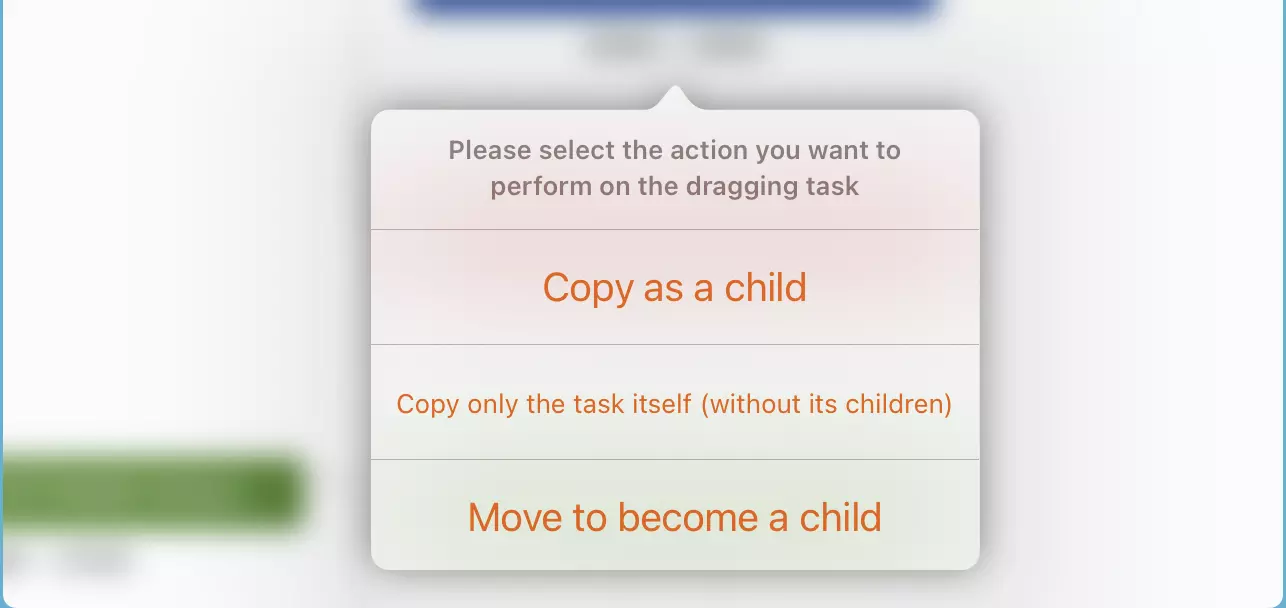
- Copy as child: Creates a copy of the dragged task as a child of the target task
- Copy only the task itself without its children: Available only for parent tasks with subtasks. This option creates a copy of the selected task while excluding any subtasks it may contain
- Move to become a child: Removes the dragged task from its current parent and relocates it as a child of the target task
Drag-and-drop copying is an exceptionally powerful tool for building your project structure. Copying entire task branches using this method can dramatically accelerate your project creation process.
Across Multiple Windows
Currently, dragging tasks between different project windows is not supported. For transferring tasks between projects, please use the copy and paste functionality instead.
Summary
By mastering these drag-and-drop techniques, you can significantly enhance your QuickPlanX experience, achieving faster and more efficient project creation and editing workflows.